
What You Will Get
Stop wasting time connecting random nodes. In this guide, we provide 3 battle-tested workflows for LTX-2:
- Photorealistic: For lifelike human motions and physical accuracy.
- Anime/Stylized: Optimized for 2D art consistency.
- Product Showcase: Smooth camera movements for cinematic advertising.
Compatibility Check:
- ComfyUI Version: Latest (Updated after Jan 2026 recommended)
- LTX-2 Weights:
ltx-2-19b-distilled.safetensors(Recommended)
Part 1: Choose Your Workflow Template
Before you start, identify your goal. Different goals require different Guidance and Motion settings.
1. The "Realism" Template (Stability First)
Best for: Human subjects, nature documentaries, and footage that needs to obey physics.
- Key Focus: Reducing "hallucinations" (morphing limbs).
- Trade-off: Slightly less creative camera movement.
2. The "Anime" Template (Style First)
Best for: 2D animation, cel-shaded looks, and artistic experimentation.
- Key Focus: Color saturation and line consistency.
- Trade-off: May require higher
stepsto clean up artifacts.
3. The "Product Camera" Template (Motion First)
Best for: Perfume bottles, tech gadgets, and food commercials.
- Key Focus: Smooth "Push-in" or "Orbit" camera moves.
- Trade-off: Requires a static subject background.
Template A: The Stable Realism Workflow (For Beginners)
This is the "Hello World" of LTX-2. If you are new, start here.
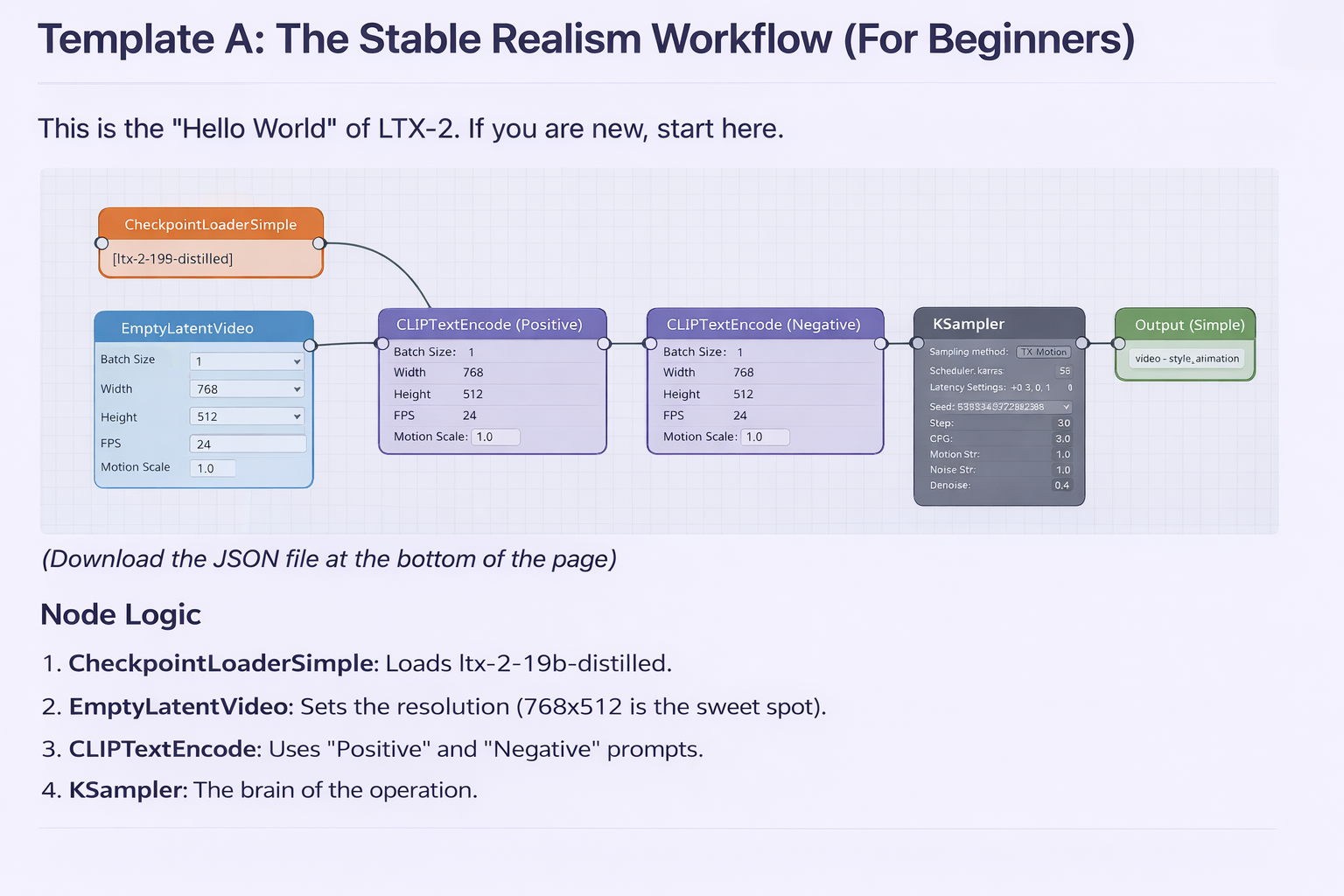
(Download the JSON file at the bottom of the page)
Node Logic
- CheckpointLoaderSimple: Loads
ltx-2-19b-distilled. - EmptyLatentVideo: Sets the resolution (768x512 is the sweet spot).
- CLIPTextEncode: Uses "Positive" and "Negative" prompts.
- KSampler: The brain of the operation.
Recommended Settings
- Resolution: 768x512 (Widescreen) or 512x768 (Mobile). Avoid 1024x1024 on consumer GPUs.
- FPS: 24 (Standard Cinematic).
- Steps: 30–35 (Going higher has diminishing returns).
- Guidance (CFG): 3.0 – 4.0.
- Too Low (<2.5): Blurry, ignores prompt.
- Too High (>5.0): High contrast, "fried" look.
- Seed: Fixed (for tuning) or Random (for exploration).
Troubleshooting Physics
- Problem: Subject is drifting or warping?
- Fix: Lower
Motion Strengthto 0.8 or increaseStepsby +5.
Template B: Stylized & Anime (Consistency)
Anime needs strong lines and vibrant colors. LTX-2 can sometimes make anime look "washed out" or "3D-rendered" if not tuned correctly.
The "Style Block" Prompting
Connect a separate Style Node or add this to the start of your prompt:
"Anime style, cel shaded, flat color, high contrast, [Your Subject]"
Reducing "Jitter"
Anime lines tend to flicker. To fix this:
- Fix the Seed: Don't change the seed between tests.
- Use a "Smoother" Scheduler: Try
sgm_uniformorsimple.
Template C: Cinematic Product Looping
Want that Apple-style product reveal? This template focuses on Camera Control.
The Camera Dictionary
Use these keywords in your prompt for specific movements (LTX-2 understands these natively):
- "Orbit right" / "Orbit left": Rotate around the object.
- "Push in": Zoom slowly into the product.
- "Dolly out": Pull back to reveal the scene.
How to Make it Look "Premium"
- Lighting: Add "studio lighting, rim light" to your text prompt.
- Materials: Specify "glass, messy texture, matte finish" to help the AI understand surface reflection.
- Slow Motion: Generate at 12 FPS and play back at 24 FPS for a 2x slow-mo effect.
Parameter Dictionary: The "Big 8"
You don't need to know every knob. Just master these 8 settings.
| Parameter | Meaning | Recommended Range |
|---|---|---|
| Resolution | Sharpness vs. VRAM | 768x512 (Best), 1280x720 (High VRAM) |
| FPS | Smoothness | 24 (Standard) |
| Frame Count | Duration (frames/FPS = seconds) | 49 or 97 (Odd numbers often loop better) |
| Steps | Detail level | 30 - 50 |
| Guidance | How strictly it follows prompt | 3.0 - 4.5 |
| Seed | Random noise pattern | Keep fixed when debugging |
| Motion Scale | How much movement occurs | 1.0 (Normal), 1.2 (High Action) |
| Denoise | Creativity vs. Input | 1.0 (Text-to-Video), 0.6 (Image-to-Video) |
Common Errors & Fixes
1. Red Nodes / "Missing Node" Error
- Symptom: You load the JSON and boxes turn red.
- Fix: Open ComfyUI Manager -> Click "Install Missing Custom Nodes". Restart ComfyUI.
2. Black Screen / Green Noise Output
- Symptom: The video finishes but is solid black or static.
- Fix: You are likely using
bfloat16on a GPU that doesn't support it (like older GTX cards). Forcefp16orfp32in your command line arguments:--force-fp16.
3. OOM (Out of Memory)
- Symptom: "CUDA out of memory".
- Fix:
- Close Chrome/Photoshop.
- Lower output resolution.
- Add
--lowvramto your ComfyUI bat/sh file.
When NOT to Use ComfyUI?
ComfyUI is powerful but messy. Sometimes, it's better to verify your idea first before building nodes.
- Scenario A: You need to show a client 3 concepts now.
👉 Use the Online Generator. - Scenario B: You want to integrate this into your own website.
👉 Use our API.
FAQ
Q: I copied the workflow but the video flickers.
A: Check your CFG/Guidance. If it's too high (>5), LTX-2 tries too hard to "draw" every frame, causing flicker. Lower it to 3.5.
Q: How do I keep the same character consistent?
A: Use a specific seed and consider using "IPAdapter" nodes (coming soon for LTX-2) or very specific character descriptive tags (e.g., "blue tie, scar on left cheek").
Q: Which parameter saves the most VRAM?
A: Resolution. Dropping from 1024px to 768px saves ~40% VRAM memory.
Are you ready to move beyond downloading?
- Need the model files? Go back to Download Guide
- Want to code this instead? See API Guide
- Need inspiration? Prompt Templates